
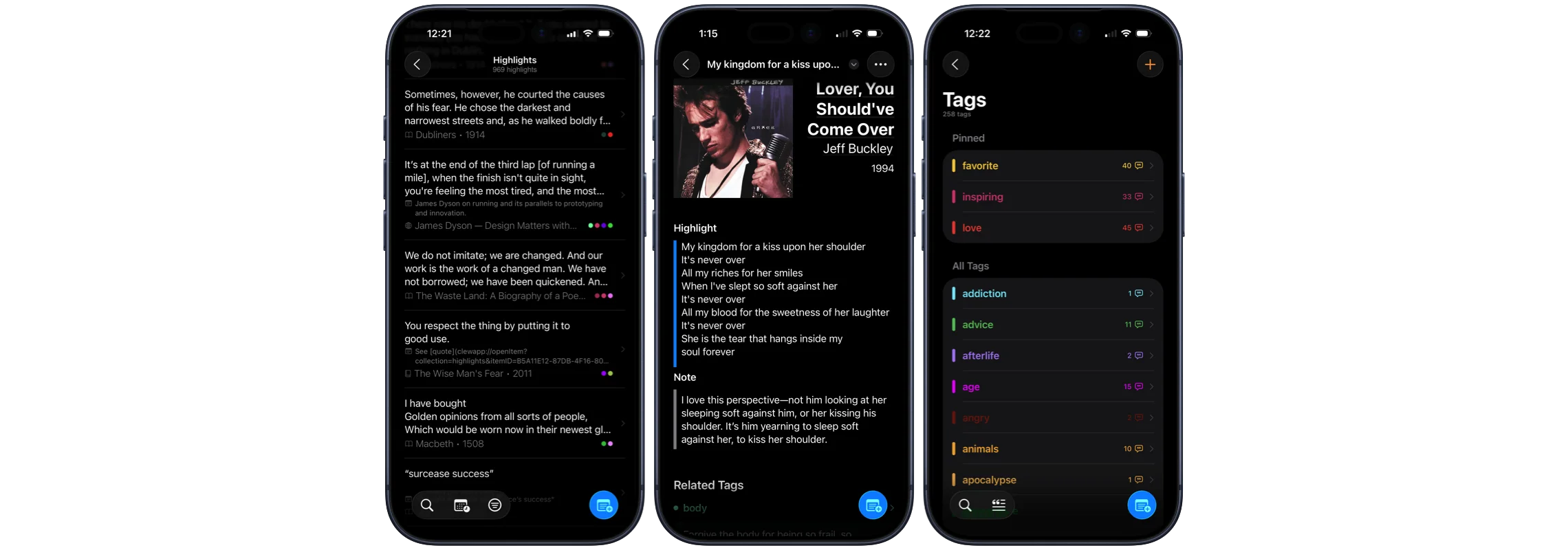
I Built an iOS App: Introducing Clew
It started when I went back to reading mostly paper books after years of trying ebooks. On paper, I’d underline passages and write margin notes, then finish the book, close it, and likely never see those highlights or notes again.
When I was an English major reading three books a week, it was easy to remember those notes and passages because I was using them in discussions and essays every day, referencing them alongside other works, and making connections all the time.
I wanted that kind of experience—creating and discovering links across books, genres, centuries, and even between books and films, songs, poems, and more.
I wanted to create an intelligent tool to store these highlights and surface them, to put them in conversation with each other.
There are places out there like Goodreads where you can store notes and clippings online. There’s your iPhone’s Notes app, where you can toss thousands of highlights from books and, similar to my problem on paper, never see them again. There are complex systems, wiki-style note-taking apps like Obsidian and Notion, that could do this with a lot of heavy lifting.
I wanted to build something better.
I wanted something that made it faster to save highlights, simpler to categorize them, and more fun to collect and explore them. I wanted it to work with no fuss on all my devices (Apple devices, at least for now…).
So, I started learning iOS development and building an app, which I was calling ‘Breadcrumbs.’ Pretty quickly, I realized that this was the way I wanted to build a library of highlights over my lifetime.
That was in 2021. Been working on this for 4+ years.
Today, you can download Clew for free on the App Store.
What Is Clew?

A commonplace book is what used to be a physical notebook that creative people used to save passages from books, poems, correspondence, etc. Things that inspired them, that made them laugh or cry, that they’d like to reference in future work.
It hit me on Friday, September 19, 2025 at 10:47 p.m., that this is the fundamental idea behind Clew. I know this because I was reading Pynchon’s The Crying of Lot 49 when I underlined this passage on page 129 of the book and saved it as a highlight in Clew:
Lucky for me,” said Bortz,” Wharfinger, like Milton, kept a commonplace book, where he jotted down quotes and things from his reading.”
Until that moment, I hadn’t had the exact word for what Clew was—a database, a notebook, a research app, a PKM tool/digital garden?
It’s all of those things, I guess, but at its heart, it’s a modern commonplace book—one that’s searchable, easy to organize, and fun to use.
What Is a “Clew?”
Want to know the meaning behind the name? Download the app and go to the About section in Settings to find out! (You could look it up. But it’s more fun if you don’t.)
Why Clew Is Better
My goals for Clew are:
- intelligent context and connections between saved highlights
- simple but powerful organization capabilities
- the fastest highlight creation possible, so you don’t interrupt your reading flow
Intelligence
Clew is smart, and it’s only getting smarter.
Right now, when viewing a highlight, it shows related highlights based on the source (book, website, song, etc.) and the tags you’ve attached.
Clew also suggests new and existing tags when you’re creating and editing highlights.
In the near future, the app will use your iPhone’s on-device AI to provide additional context and connections between saved items (no internet connection required).
Organization
In the old days of paper commonplace books, people had to set up their organization system ahead of time. They had to define sections and keep them sorted and organized as they added clippings.
In Clew, you simply add tags to your highlights. You come up with the tags as you go, so you don’t have to plan anything or stick to one organization style. And it’s easy to go back and add new tags to old highlights.
You can use tags like “funny” and “inspiring” to connect highlights by themes. Then, you can use the “inspiring” tag in a home screen widget to show sparks of motivation throughout the day.
You can also browse collections by source or author. And, soon, you’ll be able to create custom collections based on tags, dates, and other characteristics.
Speed
It’s important that the app doesn’t interrupt you while you’re reading, so I’m focused on making it as fast as possible to create new highlights.
You can use the page scanner to scan book pages and paper documents and quickly select the text you want to save. Or, you can dictate highlight text using the iPhone’s microphone.
I’ve got more ideas to speed things up even more, so stay tuned.
BONUS: Widgets on the Home Screen and Lock Screen
I didn’t know how much I’d love Clew’s widgets until I built them.
You can show random or specific highlights from your collection right there on the home screen or lock screen of your iPhone, iPad, and Mac!
Throughout the day, you’ll get glimpses of past highlights you’ve saved. Maybe you’ll experience some serendipity as the app surfaces funny, beautiful, inspiring, or interesting snippets that past-you saved for future-you.
Clew 1.0 Is Just the Beginning
At the time of writing, Clew is already on version 1.3, and it’s been available on the App Store since April. But that was more of a soft launch.
Since then, I’ve polished all the rough edges and added significant new features: view customizations, AI tag suggestions, support for songs in addition to books and websites, and more.
Now, it’s showtime.
And it’s only going to get better from here. I’m talking support for movies and TV series, podcasts, and audiobooks. I’m talking fun social features, like gorgeous shareable highlight images for your feeds and stories.
For a more complete rundown of what I’m working on, check out the roadmap on the Clew website.
If you like the app, let me know! And if there’s a feature that you’d love to see (or a bug you spot), send me an email and I’ll see what I can do. 📱